
Blog
NotebookLM, Notion AI, and the Rise of Knowledge Workbenches (2026)
Comparing NotebookLM alternatives in 2026: see how NotebookLM vs Notion AI vs Heptabase vs Kiori differ across the knowledge loop — and which workbench fits your workflow.
NotebookLM, Notion AI, and the rise of knowledge workbenches (2026)
AI tools that promise to “work with your knowledge” have exploded over the last two years. You can chat with PDFs, ask questions across documents, and generate summaries, flashcards, specs, and explanations in seconds. Yet searching PDFs and documentation still has deep limitations that simple chat layers don't solve.
At first glance, tools like NotebookLM, Notion AI, Heptabase, and newer platforms all seem to live in the same category of NotebookLM alternatives.
They don’t. The real difference is not features—it’s what kind of knowledge work the tool is optimized for.
Why people look for “NotebookLM alternatives” in the first place
When people search for “NotebookLM alternatives,” it is rarely because they have a precise requirement in mind. More often, it is curiosity or mild unease.
NotebookLM feels powerful but also bounded. You get good answers, yet the knowledge does not seem to go anywhere — a pattern we call disposable answers. Over time, people start wondering:
“This is cool… but what else is out there?”
That question usually comes before people can name the underlying problem. Most users are not switching tools yet—they are probing the space.
A simple knowledge loop to make sense of the landscape
One useful way to compare these tools is through a knowledge loop. A modern, practical loop looks like this:
- Find / Retrieve – access relevant information when needed.
- Curate – select and capture what matters.
- Organize – place knowledge into a system or structure.
- Create – synthesize, write, decide, or build something new.
- Share – expose knowledge so it can be reused or challenged.
- Use & Learn – apply knowledge and evolve understanding.
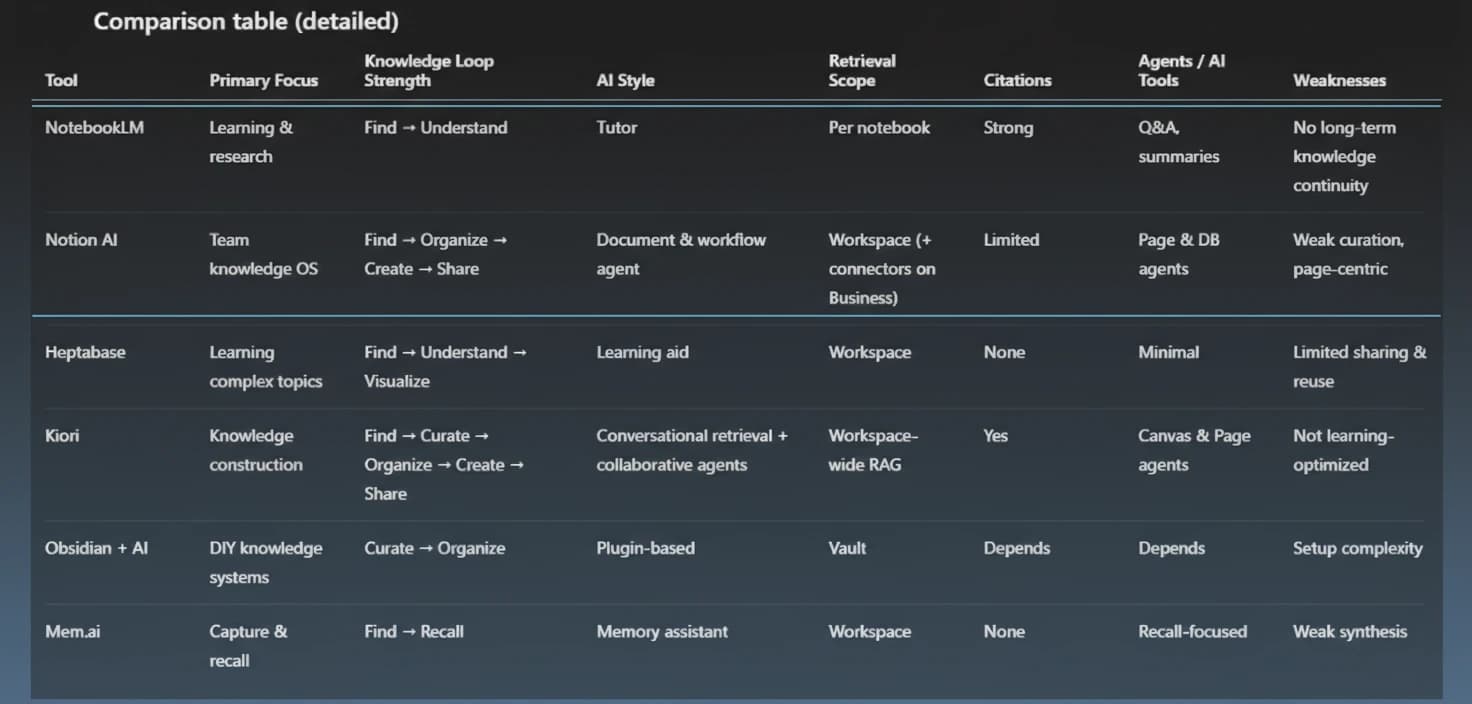
Most tools are excellent at one or two of these steps. Very few support the whole loop end to end.
What NotebookLM is actually optimized for
NotebookLM is best understood as a learning and research assistant. It excels at:
- chatting with a bounded set of sources
- strong grounding and citations
- high-quality explanations
- multiple representations of the same material: summaries, FAQs, flashcards, audio overviews
- shared notebooks and team usage via Google Workspace
All of this points in the same direction. NotebookLM assumes:
- there is an existing body of material
- the user’s goal is understanding and retention
- success looks like clarity, not construction
NotebookLM helps you learn from knowledge. It does not try to maintain a long-running, evolving knowledge system across projects. That is a design choice, not a flaw.
What to look for in a NotebookLM alternative
If you are evaluating NotebookLM alternatives, look for whether the tool supports the whole loop—not just chat or summaries. The best fits help you move from retrieval to curation, organization, creation, sharing, and ongoing reuse without resetting context.
Notion AI today: powerful retrieval and creation, but team-first
Notion AI is the biggest player in this space, and it deserves careful treatment.
What Notion AI does very well
Notion AI is genuinely strong at:
- workspace-wide semantic retrieval
- turning existing notes into clean documents
- rewriting, summarizing, and transforming content in place
- database-aware actions and workflows
- collaboration and shared knowledge at scale
For teams, Notion AI functions like an in-document and workflow agent. It shines once knowledge is already structured.
The important pricing and access reality
As of 2025, full Notion AI access is no longer available as a standalone add-on for new users.
- Full AI access requires the Business plan
- Roughly $20 per user/month (annual billing)
- Free and Plus plans only offer limited AI trials
This matters because it reinforces Notion’s positioning. Notion AI is now clearly organization-first, team-oriented, and bundled with features many individual users do not need. For solo creators and researchers, this can feel like overkill.
Where Notion fits in the knowledge loop
Notion is strongest at Find / Retrieve, Organize, Create, and Share. Where it is weaker is curation. Knowledge in Notion tends to move directly from retrieval into finalized pages or databases. There is little support for holding partial, evolving understanding in between.
A precise way to describe it: Notion is a knowledge operating system for teams, not a knowledge workbench for exploratory thinking.
Heptabase and learning-centric visual thinking
Heptabase describes itself as “the visual note-taking tool for learning complex topics.” That description is accurate.
Heptabase excels at:
- deep reading of PDFs
- conceptual understanding
- visualizing relationships on boards
- organizing ideas to improve comprehension
You can create documents, but creation is usually downstream of learning. Heptabase helps you understand complex material better. It is not primarily optimized for publishing, reuse across projects, or collaborative knowledge construction.
Knowledge workbenches and where Kiori fits
Kiori is built around a different assumption. Kiori is not a study tool. It is a knowledge workbench.
Kiori as a NotebookLM alternative for persistent knowledge
Kiori supports:
- Find / Retrieve through conversational search over documents, PDFs, links, and connected tools
- Curate by capturing important answers and fragments as cards
- Organize through canvases and structured pages
- Create via drafts, synthesis, and evolving documents
- Share through team and public workspaces
You still chat with sources and retrieve grounded answers — and grounding matters, because AI hallucinates when it lacks traceable sources. The difference is what happens next.
Instead of treating answers as disposable, Kiori encourages capturing important responses back into the workspace so they remain visible and reusable. Cards placed on canvases keep knowledge tied to a topic instead of disappearing into chat history.
Understanding does not reset after a good answer. It accumulates — reducing the cognitive load of context switching that plagues fragmented workflows.
Where Kiori is not a good fit
Kiori is weaker if:
- your primary goal is studying or memorization
- you want guided learning features like flashcards
- you prefer strictly sequential, page-first workflows
That trade-off is intentional.
Other tools in context
- Obsidian + AI plugins – local-first and highly customizable. Powerful for users who want full control, but requires setup and maintenance. For a deeper look at PKM tool trade-offs, see our piece on notetaking in the age of AI.
- Mem.ai – optimized for capture and recall. Strong AI memory layer, weaker for synthesis and spatial thinking.
Each of these tools makes sense once you understand which part of the loop it emphasizes.
The real takeaway: choosing the right knowledge tool category
The mistake is not choosing the wrong tool. It is choosing the wrong category.
NotebookLM is excellent at learning. Notion AI is excellent at organizational clarity. Heptabase excels at understanding complexity. Kiori is built for working with knowledge before it becomes polished.
Once you see that distinction, the landscape stops being confusing.
If you want next, we can tighten this for SEO without diluting it, turn the comparison image into a standalone resource, or extract a shorter “Which tool fits you?” decision guide.
Ready to try a NotebookLM alternative?
- Try Kiori free – start your workspace now.
- See how Kiori handles your NotebookLM workflow – explore the flow end to end.
- Compare Kiori to NotebookLM side-by-side – get a focused walkthrough of differences.
Ready to see Kiori?
Follow your thread
Jump into a live workspace to see how Kiori keeps knowledge connected across threads, docs, and teams.
Related stories
Google's Gemini Embedding 2 puts text, images, video, and audio in one vector space. Here's what that actually changes for RAG and knowledge systems — from someone implementing it in production.
A walkthrough of Kiori's knowledge flywheel — from uploading documents to AI-powered retrieval, visual curation, page creation, and back again. See how knowledge compounds.