
Blog
What Multimodal Embeddings Actually Change for Knowledge Systems
Google's Gemini Embedding 2 puts text, images, video, and audio in one vector space. Here's what that actually changes for RAG and knowledge systems — from someone implementing it in production.
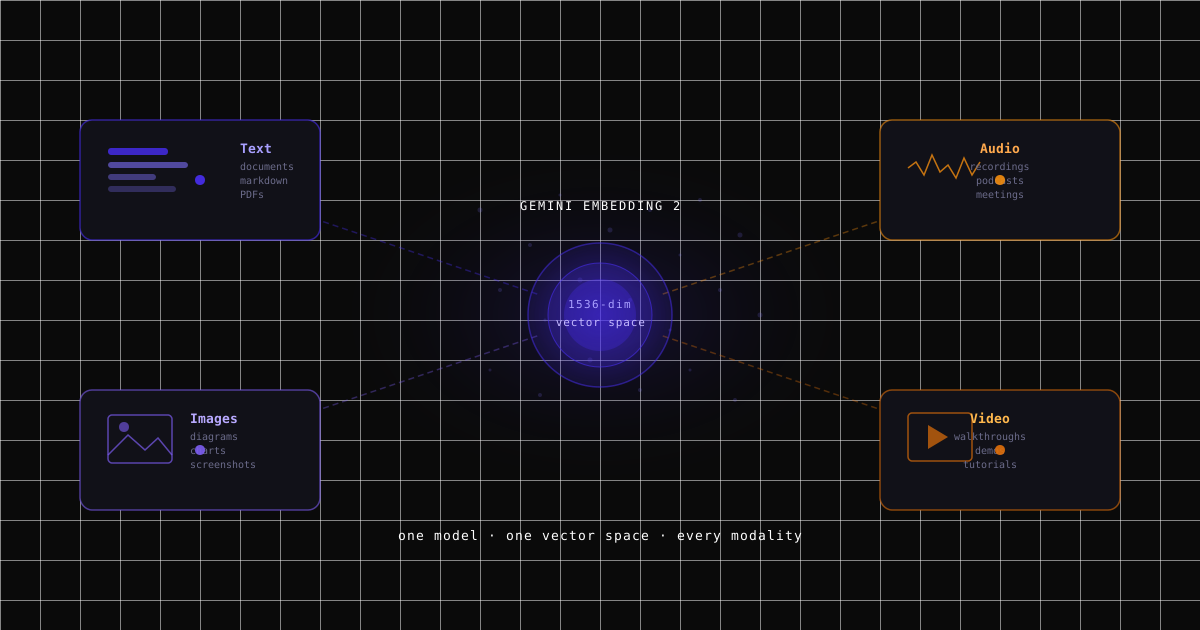
Google shipped Gemini Embedding 2 on March 10. I implemented it in Kiori the same week. Here's what it actually changes — with real architecture, real cost trade-offs, and a live demo you can try.
TL;DR
- Gemini Embedding 2 puts text, images, video, audio, and documents into a single vector space. One embedding model for everything.
- We migrated from text-only embeddings (BGE, Fireworks Qwen3) to Gemini Embedding 2 in Kiori. Text retrieval quality improved (MRR 0.918 → 0.944), and we gained multimodal search — images, audio, and video are now searchable by meaning, not just metadata.
- The trade-off is real: Gemini's text embedding costs 25x more per token than Fireworks. But embedding is a one-time ingestion cost, and the 25% storage savings from smaller vectors compound monthly. The math works out — payback period is 1-3 months depending on scale.
- A text query can now return a relevant chart, a video clip, or an audio segment — not just text chunks. The search pipeline doesn't distinguish between modalities.
- Try it live at multimodal-search-demo.kiori.co. Source code at github.com/gabmichels/gemini-multimodal-search.
Why multimodal matters for knowledge systems
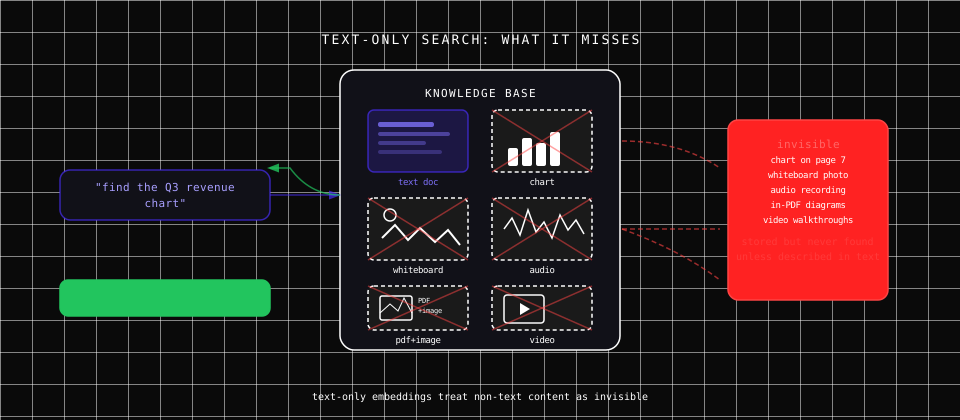
Most knowledge lives outside of text. Think about what's actually in a workspace: meeting recordings nobody has time to re-watch, presentation slides where the key insight is a diagram, whiteboard photos from brainstorming sessions, product screenshots, architecture diagrams, video walkthroughs. Text-only search treats all of this as invisible — it's stored but never found unless someone manually describes it in words.
This isn't a minor gap. Kiori's knowledge flywheel works as a loop: Ingest → Retrieve → Curate → Create → Ingest. If retrieval can only surface text, then visual knowledge and spoken knowledge get stuck at the ingestion step. They enter the system but never make it back out when someone needs them. Multimodal embedding closes that gap — everything ingested becomes retrievable, regardless of format.
And users don't think in modalities. Nobody searches "find the text chunk from the document that mentions the Q3 revenue chart." They search "find the Q3 revenue chart." They expect the system to understand what they mean regardless of whether the answer is a paragraph, an image, a timestamp in a recording, or a frame in a video.
For a concrete example of what this looks like in practice, browse zenithfall.kiori.co — a public knowledge workspace for a tabletop RPG game. Tons of pages, heavy on images: character portraits, maps, world-building pictures. With text-only search, all of that visual content was decoration. With multimodal embeddings, it becomes queryable — ask for "the map of the Radiant Dominion" and get the actual map, not just the page that mentions it.
The before: text-only embeddings and their blind spots
Until this week, Kiori ran on text-only embeddings. Upload a document, chunk the text, embed each chunk into a vector, store it in Qdrant. When you search, your query gets embedded into the same space and the system finds the nearest text chunks.
This works remarkably well for text. The existing pipeline (dense vectors + BM25 keyword matching, reciprocal rank fusion, cross-encoder reranking) handles multilingual queries, semantic paraphrasing, and cross-document synthesis across 15+ document formats.
But a financial report has a revenue chart on page 7 with no alt text. A recorded user interview has tone, hesitation, and emphasis that a transcript flattens. A scanned whiteboard contains spatial relationships that OCR destroys. Text-only embeddings are blind to all of it.
What Gemini Embedding 2 actually is
Google released Gemini Embedding 2 on March 10, 2026. Here's what matters technically:
One vector space for everything. Text, images, video (up to 128 seconds), audio (up to 80 seconds), and documents (up to 6 PDF pages) all get mapped into the same embedding space. A diagram and a paragraph describing that diagram end up near each other — not because one was extracted from the other, but because the model understands both natively.
Matryoshka dimensions. Output ranges from 128 to 3,072 dimensions. We chose 1,536 as a balance between quality and storage. Google hasn't published per-dimension MTEB breakdowns for Gemini Embedding 2 specifically, but the predecessor model (gemini-embedding-001) scores 68.17 at 1,536d vs 68.16 at 2,048d on MTEB — a difference of 0.01 at half the storage cost.1 Gemini Embedding 2 uses the same Matryoshka architecture and is positioned as a step up in quality, so the trade-off is at least as favorable. This opens interesting product possibilities — you could run a free tier at 768 dimensions and a pro tier at 1,536 without changing models.
Task-typed embeddings. RETRIEVAL_DOCUMENT when indexing, RETRIEVAL_QUERY when searching. This asymmetric optimization matters because queries are short and documents are long — they need different representations. Our eval showed this improving MRR from 0.918 to 0.944 (+2.8%).
100+ languages. Natively multilingual. We run on GCP europe-west4 and serve users across Europe. Cross-language retrieval works out of the box.
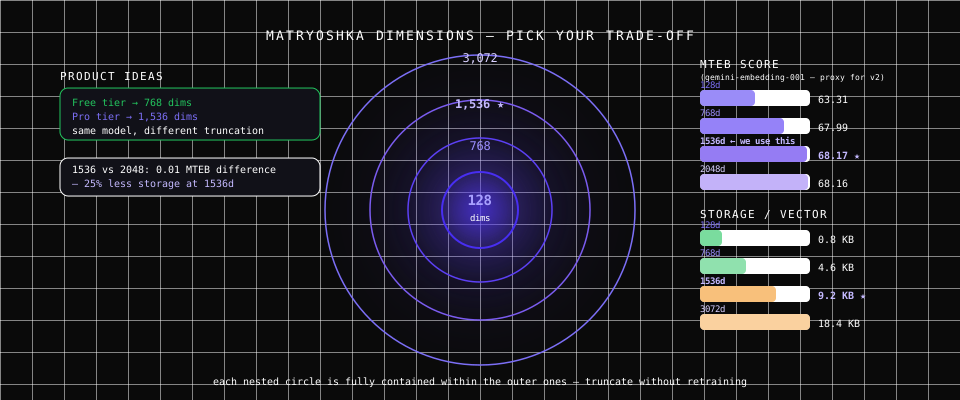
MTEB scores shown are from gemini-embedding-001 — the closest publicly documented proxy. Google has not published per-dimension benchmarks for Gemini Embedding 2. Source: Google Embeddings API docs.
The cost trade-off (honest numbers)
I'm not going to pretend this was a pure upgrade. There's a real cost trade-off, and understanding it is the difference between a good engineering decision and a bad one.
| Provider | Dimensions | Multimodal | Cost/1M tokens | Storage/vector |
|---|---|---|---|---|
| BGE small (self-hosted) | 384 | No | Free (infra only) | 2.3 KB |
| OpenAI text-embedding-3-small | 1,536 | No | $0.02 | 9.2 KB |
| Fireworks Qwen3-8B | 2,048 | No | $0.008 | 12.3 KB |
| Gemini Embedding 2 | 1,536 | Yes | $0.20 | 9.2 KB |
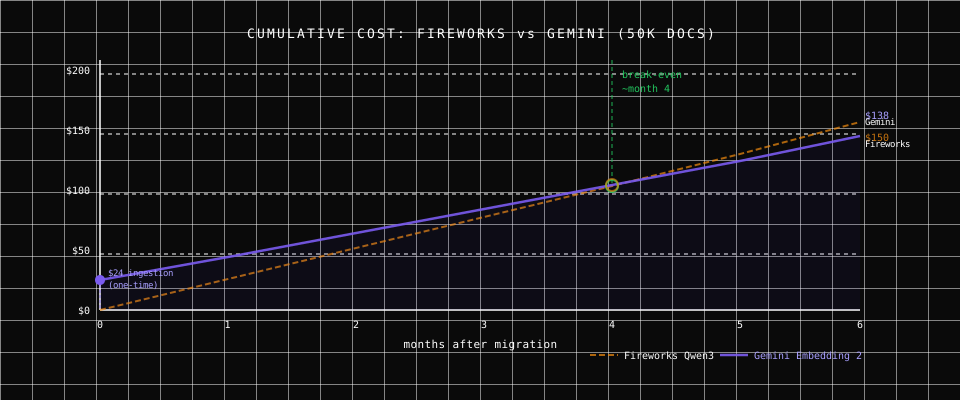
Gemini's text embedding is 25x more expensive than Fireworks per token. That's not a rounding error. But here's the key insight that makes the decision rational: embedding is a one-time ingestion cost, and storage is ongoing.
Each document gets embedded once at upload. That $0.20/1M tokens hits your bill exactly once per document. Storage gets billed every month for as long as those vectors exist. At 1,536 dimensions (Gemini) vs 2,048 (Fireworks), Gemini vectors are 25% smaller — and that saving compounds every month.
Here's how the payback math works at different scales:
| Scale | Docs | Ingestion premium (one-time) | Monthly storage savings | Payback period |
|---|---|---|---|---|
| Small team | 5K | $2.40 | $5/mo | < 1 month |
| Growth | 50K | $24.00 | $25/mo | 1 month |
| Scale | 500K | $240.00 | $75/mo | ~3 months |
| Enterprise | 5M | $2,400.00 | $800/mo | 3 months |
At every scale tier, the higher ingestion cost is recovered within 1-3 months through lower storage costs. After that, Gemini is the cheaper option on an ongoing basis — and the only one with multimodal capability.
For the multimodal embeddings specifically: image embedding costs $0.45/1M tokens, audio is $6.50, and video is $12.00. These are higher, but they're also one-time ingestion costs for content types that previously couldn't be embedded at all. There's no cheaper alternative — the capability simply doesn't exist elsewhere.
When this trade-off doesn't work: If you're running text-only workloads with no need for image/audio/video search, Fireworks is still cheaper. If you have very high document churn (frequently re-embedding rather than adding), the 25x per-token cost matters more. And if you need a 32K token context window, Gemini's 8K is a limitation.
How the architecture changes
Ingestion: one model, multiple paths
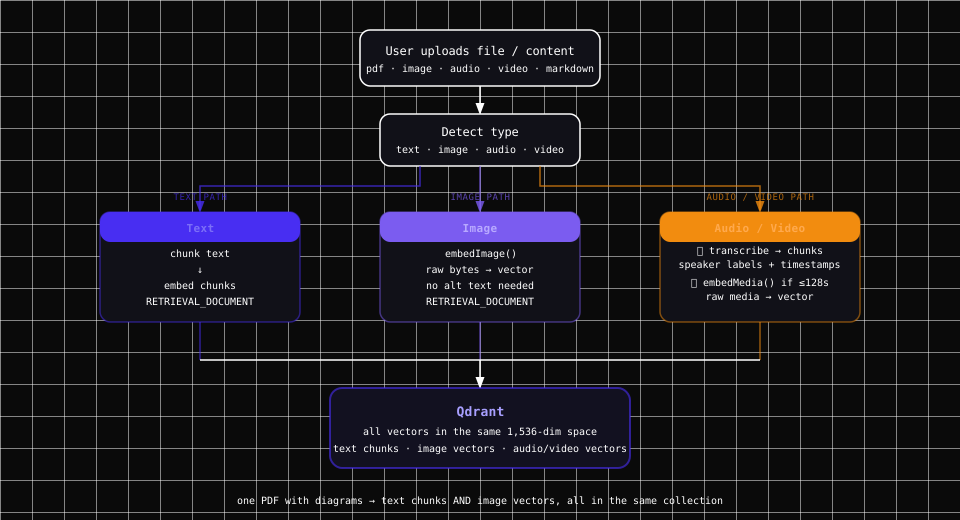
A single document can now produce multiple types of embeddings. A PDF with diagrams yields text chunks AND image embeddings. An uploaded video gets transcribed into speaker-aware text chunks AND (if under 128 seconds) a raw video embedding. All of them live in the same Qdrant collection, in the same 1,536-dimensional vector space.
For audio and video, we run two parallel paths:
- Transcription via Gemini's generative API — full timestamped transcript with speaker diarization. The transcript becomes searchable text chunks grouped by speaker turns.
- Multimodal embedding — for short files (audio ≤80s, video ≤128s), the raw media is also embedded as an audio/video vector for direct cross-modal matching.
Longer files rely on the transcript path only. Gemini's transcription quality is excellent — automatic speaker diarization, timestamps at topic changes, non-verbal cues like [music] and [applause]. In practice, the transcript is what returns results most of the time. The raw media embedding is a bonus that helps when a query is about something the transcript doesn't capture well.
Search: modality-agnostic retrieval
When a user searches:
- Query text is embedded with
RETRIEVAL_QUERYtask type - Qdrant performs vector similarity search across ALL points — text, image, audio, video
- BM25 keyword search runs in parallel (text content only)
- Fusion scoring combines vector + keyword results
- Cross-encoder reranker re-scores top candidates
- Results returned with source attribution
The search pipeline doesn't distinguish between modalities. A text chunk, an image vector, and a video vector are all just points in the same space. The best matches surface regardless of their original type.
What this looks like in practice
Finding a chart nobody described
You upload a financial report. Page 7 has a revenue chart with no alt text.
Before (text-only): Searching "revenue chart" only finds text that literally mentions "revenue chart." If the surrounding text doesn't describe the chart, it's invisible.
After (multimodal): The chart is embedded as an image vector. Searching "revenue growth chart" matches the visual content itself. The image was never described in text — Gemini understood what it shows and matched it semantically.
Searching meeting recordings
A user uploads a 45-minute meeting recording. Gemini transcribes it with timestamps and speaker labels:
[0:00] [music]
[0:02] Speaker 1: Let's get started with the quarterly review.
[0:35] Speaker 2: The EMEA numbers are concerning...
[12:34] Speaker 2: The budget proposal needs to be revised before Friday.
"What did they say about the budget?" finds the specific segment where Speaker 2 discusses the budget, with timestamp [12:34]. Speaker-aware chunking means you get precise results, not a wall of transcript text.
Cross-modal retrieval
This surprised me in testing:
| Query (text) | Can match... |
|---|---|
| "chart showing revenue growth" | An image of a revenue chart |
| "meeting where they discussed the budget" | Audio transcript + raw audio embedding |
| "video with the product demo" | Video transcript + raw video embedding |
| "find the German advertisement" | Audio segment with German speech |
The German ad example is real — we tested with a podcast that starts with a German advertisement and switches to English. Gemini detects the language change automatically. You can search for content in either language.
What works well and what doesn't (yet)
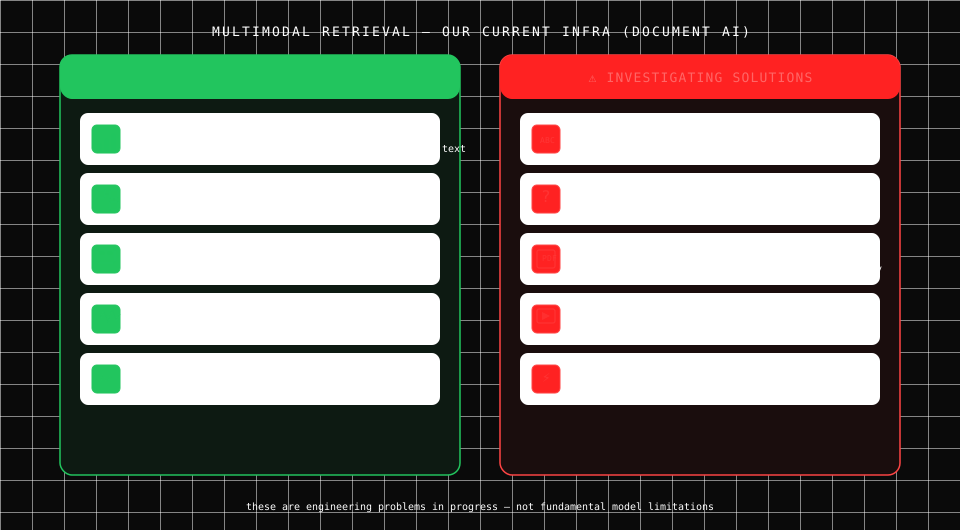
This reflects our current production setup — we use Google's Document AI Layout Parser for document ingestion, which shapes some of these trade-offs.
Works well so far
- Charts, graphs, and data visualizations — high confidence matches, often better than searching surrounding text
- Diagrams and technical drawings — architecture diagrams, flow charts, ER diagrams
- Screenshots with visible UI elements — useful for product and UX knowledge bases
- Speaker-diarized audio — transcription quality is excellent, with speaker-aware chunking making search precise
- Multilingual audio/video — language detection is automatic and seamless
Needs more work — we're investigating
- Tiny text within images — OCR is still better for extracting text from screenshots. Multimodal embeddings understand what an image shows, not what the text in it says. We're looking at a hybrid pass that runs OCR alongside multimodal embedding for screenshots.
- Abstract or highly contextual images — an image that only makes sense next to the paragraph above it doesn't embed well in isolation. Possible fix: embed image + surrounding text together as a combined chunk.
- PDF image extraction — Google's Document AI Layout Parser can extract images from PDFs, but the image annotation feature is still in Preview. For now, standalone image uploads work; in-PDF images need manual extraction. We're watching the Preview closely.
- Long video visual search — only videos ≤128 seconds get a raw video embedding. Longer videos rely on the transcript, which is still very good but misses purely visual content. Investigating frame-level extraction for longer clips.
- Long audio search — same limit applies: only audio ≤80 seconds gets a raw audio embedding. Longer recordings rely on the transcript. Works well in practice since transcription quality is high, but raw semantic audio matching is lost for longer files.
- The "noisy image" problem — decorative headers, logos, separator lines all get embedded and can pollute results. We're building ingestion-time filtering heuristics to catch these before they hit the index.
What new UX becomes possible
Architecture changes are means to an end. Here's what users can actually do now:
"Find the diagram that explains X." In a workspace with hundreds of documents, the architecture diagram from page 47 of a deck uploaded three months ago becomes findable by describing what it shows — not by remembering the file name.
Visual answers to visual questions. When someone asks "How does the authentication flow work?" the system can return the sequence diagram alongside the text explanation. The answer becomes multimodal because the source material was multimodal.
Audio and video as first-class knowledge. Meeting recordings, podcast episodes, video tutorials — these have always been second-class citizens in knowledge tools because they required transcription and lost the original context. With native media embeddings and speaker-diarized transcripts, they become as searchable as text documents.
Canvas curation with visual elements. In Kiori's knowledge flywheel, the curation step happens on canvases where you organize insights spatially. When retrieval returns images and diagrams alongside text, those visual elements flow onto the canvas as cards — text snippets, source charts, and retrieved diagrams in one view.
Why this matters beyond Kiori
Until now, multimodal RAG meant building separate pipelines: an image captioning model to describe images as text, a speech-to-text service for audio, a video frame extraction pipeline for video — then embedding all the resulting text. Each pipeline added latency, cost, and information loss. The caption is never as good as the image.
A unified multimodal embedding model collapses all of that into one API call. One model, one vector space, one search query. The architecture gets simpler while the capability gets richer.
This also changes how you think about what a "knowledge base" is. It's not just PDFs and markdown files. It's screenshots from user research, recorded customer calls, product demo videos, whiteboard photos from brainstorming sessions. All of it becomes queryable by meaning.
I think this is where knowledge tools are heading. The gap between what you know and what your tools can find has always been biggest for non-text content. Multimodal embeddings close that gap. The capability to do it well now exists. The question is just who builds it into their product first.
Try it yourself
Live demo: multimodal-search-demo.kiori.co — upload images, audio, video, and text, then search across all of them.
Source code: github.com/gabmichels/gemini-multimodal-search — the full implementation, open source.
Kiori: kiori.co — the production knowledge workspace where multimodal retrieval is rolling out. The free tier gives you the full knowledge flywheel: AI threads, canvases, pages, and now multimodal search.
References
- Google — Gemini Embedding 2: Our first natively multimodal embedding model — March 10, 2026.
- Google Developers — Embeddings API Documentation — Technical reference.
- Google Cloud — Gemini Embedding 2 on Vertex AI — Integration guide.
- Kiori — The Knowledge Flywheel — How the upload → query → curate → create → re-index cycle works.
- Kiori — Why Searching PDFs Still Sucks — The retrieval problem that multimodal embeddings help solve.
- GitHub — gabmichels/gemini-multimodal-search — Open-source implementation.
Footnotes
-
Per-dimension MTEB scores are published for
gemini-embedding-001in Google's Embeddings API documentation (see "Ensuring quality for smaller dimensions"). Google has not yet published equivalent breakdowns for Gemini Embedding 2. The table shows 1,536d: 68.17, 2,048d: 68.16 — a 0.01 difference. Given that Gemini Embedding 2 is positioned as a quality improvement overgemini-embedding-001, the Matryoshka trade-off is at minimum comparable. ↩
Ready to see Kiori?
Follow your thread
Jump into a live workspace to see how Kiori keeps knowledge connected across threads, docs, and teams.
Related stories
A walkthrough of Kiori's knowledge flywheel — from uploading documents to AI-powered retrieval, visual curation, page creation, and back again. See how knowledge compounds.
Fandom is broken, MediaWiki is outdated, and Wiki.gg is incremental. Explore the best wiki and Fandom alternatives in 2026 — community-owned, ad-free, and AI-augmented.