
Blog
Notetaking in the Age of AI: When Your Brain Needs a Thinking Partner
PKM power users hit a wall when capture outpaces retrieval. Learn why your Obsidian vault feels unusable at scale and how AI note-taking with a thinking-first workflow restores continuity.
TL;DR
If your vault has become a museum you rarely visit, AI is not going to "think for you," but it can absolutely help you stop restarting from zero by resurfacing what matters, keeping your context intact, and cutting the time it takes to turn messy inputs into usable knowledge.
The big picture
PKM power users in Obsidian, Roam Research, Logseq, and Tana often hit the same wall: your system keeps capturing more information, but your ability to retrieve and reuse it does not scale with it. The symptoms are familiar: search returns too much, context is missing, duplicates pile up, and the vault becomes "technically organized" but practically unusable. Community threads about large vault performance, slow search, and general sluggishness show up again and again, even among highly competent users. [1][2]
This is not just a tooling issue. It is a human cognition issue. Working memory is limited, cognitive load spikes when information is unstructured, task switching leaves attention residue, and memory retrieval is strongly context-dependent. [3][4][5][6] You can build disciplined systems that work, but personal information management research is blunt about what "works" entails: acquiring, organizing, maintaining, and re-finding is ongoing work, and many people never land on a setup they can sustain. This is why some teams turn to shared knowledge bases like community wikis, only to hit similar scaling problems at the organizational level. [7][8]
AI changes what is possible, but only if you treat it as a partner that compensates for these limits, not a replacement for judgment. The most reliable pattern is "grounded assistance," where generation is anchored in retrievable sources instead of pure parametric recall. Retrieval-Augmented Generation (RAG) and dense retrieval (DPR) are canonical examples of this approach at the research level. [9][10]
This post proposes a simple shift in philosophy: the goal is not better storage, it is better continuity. A thinking-first tool should (1) resurface relevant information when you need it, (2) keep you structured and organized without constant manual upkeep, and (3) reveal blind spots in your reasoning so you can actually build knowledge over time. That is the philosophy behind Kiori. Kiori is designed for multimodal input (notes, links, images, videos, audio), fast value extraction (transcription, highlights, structured outputs), context linking, preserved reasoning threads, and quick iteration via inline AI in the place you are already working. The intent is straightforward: reduce the time to extract usable information, and reduce the mental cost of picking up where you left off.
The PKM wall: when note capture outpaces retrieval
Let's start with the honest part. Most serious PKM people do not quit their tool because they got bored. They quit because the tool stopped paying rent. You can feel it in the community conversations:
- "Search is slow in large vaults, why is the quick switcher instant but full search drags?" [1]
- "How many notes can a vault handle before things get sluggish?" [2]
- "My graph gets slower and slower, typing lags, commands take forever." [2]
- "Imported my graph and now big pages are basically unusable." [2]
And you will also see the subtler signal: people casually reporting vault sizes like 13k notes, 10GB, attachments everywhere, and a general sense of "it works… until it doesn't." [2] That wall tends to show up in three layers:
The retrieval layer
Search returns too much. Or too little. Or the right note is in there, but you cannot identify it quickly. Traditional search is good at matching strings. It is much worse at matching intent — a problem that plagues PDF and document search just as much as it does note vaults. PKM power users compensate by using tags, backlinks, naming conventions, and manual review habits. That works, but it is labor. [7]
The context layer
Even when you find the note, it feels "contextless." You see a quote, a bulleted list, a raw excerpt, a half-formed thought, and you think: "Cool. Why did I save this?" That "why" is the real missing data.
The continuity layer
You lose the thread across days and weeks. You start the same research again. You re-derive the same conclusions. You rewrite the same outline because you cannot quickly reconstruct where you were. Your answers become disposable instead of living knowledge. At that point your vault is not helping you think, it is just helping you hoard.
A lot of PKM tools are extremely good at capture and connection. They are less good at maintaining continuity. And continuity is the thing you actually feel when your work becomes "a brain on steroids" instead of a pile of files.
Your brain isn't built for giant vaults, and that is the whole point
If you want the deeper cognitive dive, we already wrote it in "Losing the Thread of Thought." This post is the PKM version of that same story, with one practical question in mind: why do giant vaults feel unusable even when they are "well organized"? The short answer is: your note app can scale indefinitely, your cognition cannot. And the mismatch shows up in predictable places.
Working memory is tiny
The classic working memory model from Alan Baddeley and Graham Hitch describes a limited-capacity system that supports reasoning and comprehension. [3] More modern capacity work, especially Nelson Cowan's "magical number 4," argues that the number of chunks you can actively hold and manipulate is closer to about four than seven. [4] So when you open a topic and your system surfaces 40 linked notes, your brain does not feel empowered. It feels overloaded.
Cognitive load is the silent killer
John Sweller's classic cognitive load work argues that problem-solving can consume the limited processing capacity you need for learning and schema building. [5] In PKM terms: if the act of "finding and reloading context" is expensive, you burn your mental budget before you get to the thinking part. This is why people with large vaults often feel like they are doing "maintenance work" instead of knowledge work. The cognitive load is being spent on navigation and reconstruction.
Attention residue makes switching into your vault harder than you think
The attention residue finding from Sophie Leroy's work is basically this: when you switch tasks, especially before finishing the prior one, part of your attention stays stuck. Performance suffers. [6] Most note usage happens mid-switch: during meetings, between tasks, while spiraling on tabs. That is the worst time to do high-quality recall and synthesis. So the vault gets used as a dumping ground, not as a thinking workspace.
Context-dependent memory explains "why did I save this again?"
Duncan Godden and Alan Baddeley's underwater vs on-land study is the classic context-dependent memory example: recall improves when the learning and retrieval environments match. [11] Your PKM problem is often a context mismatch problem. You captured the note while reading a paper for Project A at 1:00 a.m. You are trying to use it today for a different problem, in a different mood, with different constraints. Without the original reasoning thread, your note is just an artifact.
Externalizing thought helps, but your system has to bring it back to you
The "extended mind" argument from Andy Clark and David Chalmers basically formalizes what PKM people already believe: tools and external artifacts can function as extensions of cognition when they are reliably integrated into how you operate. [12] But the important qualifier is "reliably integrated." If your vault is not reliably resurfacing the right information at the right time, it starts to feel less like a cognitive extension and more like a storage attic. That is the core point: a large vault is not inherently bad. It just needs a different kind of support layer once it passes human-scale navigability.
What AI should do in your notes: partner, not replacement
AI is useful in PKM when it does three things well:
- It reduces the cost of re-finding relevant context
- It reduces the cost of extracting usable information from messy inputs
- It helps you see what you are missing, not just what you already know
It is not useful when it becomes a magical answer box that floats above your system, disconnected from your actual artifacts and your actual goals. We compared how different tools handle this in our NotebookLM, Notion AI, and knowledge workbenches breakdown.
Why "grounded" AI matters for note-taking
In research terms, the argument for grounding is not new. The RAG paper by Patrick Lewis and colleagues frames a central issue: parametric models "store" knowledge in weights, but accessing, updating, and providing provenance is hard. RAG combines generation with retrieval from an explicit document store. [9] And dense retrieval work like DPR from Vladimir Karpukhin and colleagues shows you can learn embedding-based retrieval that outperforms classic sparse methods like BM25 in open-domain QA settings, improving top-k retrieval accuracy. [10]
You do not need to be doing academic QA to benefit from this. Your vault is its own corpus. Your notes are your passages. Your future self is the "open-domain question answering" user. A grounded AI layer can:
- Pull relevant snippets from your own material
- Show you where they came from
- Help you synthesize without guessing what you meant
That is very different from a chat model producing an answer from vibes — which is exactly why AI hallucinates on rules and documentation when it lacks grounded retrieval.
AI should surface blind spots, not just summarize
Summaries are nice. Blind spots are gold. A strong thinking partner should be able to say:
- "Here are the themes you keep repeating."
- "Here is what contradicts your current belief."
- "Here is the missing variable you are not accounting for."
- "Here are the assumptions you baked in earlier."
That idea lines up with sensemaking research from the NeurIPS-adjacent communities and older intelligence-analysis work: the sensemaking loop is not just collecting information, it is iteratively structuring and testing it. [13] In other words: your system needs to help you build better representations, not just store more facts.
Disciplined systems can work, but they cost real effort
This matters because some people will read this and say: "I do weekly reviews. I prune. I rewrite. I keep things clean. It works for me." Totally fair. But personal information management research explicitly includes "maintain" and "re-find" as central ongoing activities. It is not a one-time setup. It is lifecycle work. [7] Many people never find a structure they can sustain because their work and interests constantly change. And even those who do often hit fragmentation across formats and contexts, which research calls the "project fragmentation problem." [8]
So the practical question becomes: if you can use AI to lower the cost of maintenance, retrieval, and synthesis, why would you not? Not to outsource thinking. To protect your thinking time.
Thinking-first versus vault-first: a different philosophy and different outcomes
Most PKM setups are "vault-first." That is not an insult. It is a design orientation:
- The core unit is a note
- The core win is capture
- The organizing principle is folders, tags, and links
- The success metric is "can I store this cleanly?"
Thinking-first flips it:
- The core unit is a reasoning thread
- The core win is continuity
- The organizing principle is context, questions, and evolving work
- The success metric is "can I pick up where I left off and make progress?"
Here is the difference in outcomes, without dunking on any tool.
Philosophy and outcomes comparison
| Dimension | Vault-first PKM (typical setup) | Thinking-first workflow (what Kiori optimizes) |
|---|---|---|
| What grows over time | Files, links, tags | Threads, context, distilled knowledge |
| Primary pain at scale | Re-finding and context reconstruction [7][8] | Keeping continuity across time and inputs |
| How you get structure | You build it manually, then maintain it [7] | AI-assisted extraction plus context linking, then human judgment |
| What "search" feels like | "Here are 30 matches" | "Here are the 5 things that matter for your current question" |
| Typical failure mode | Vault becomes an archive you avoid [1][2] | System becomes a workspace you return to |
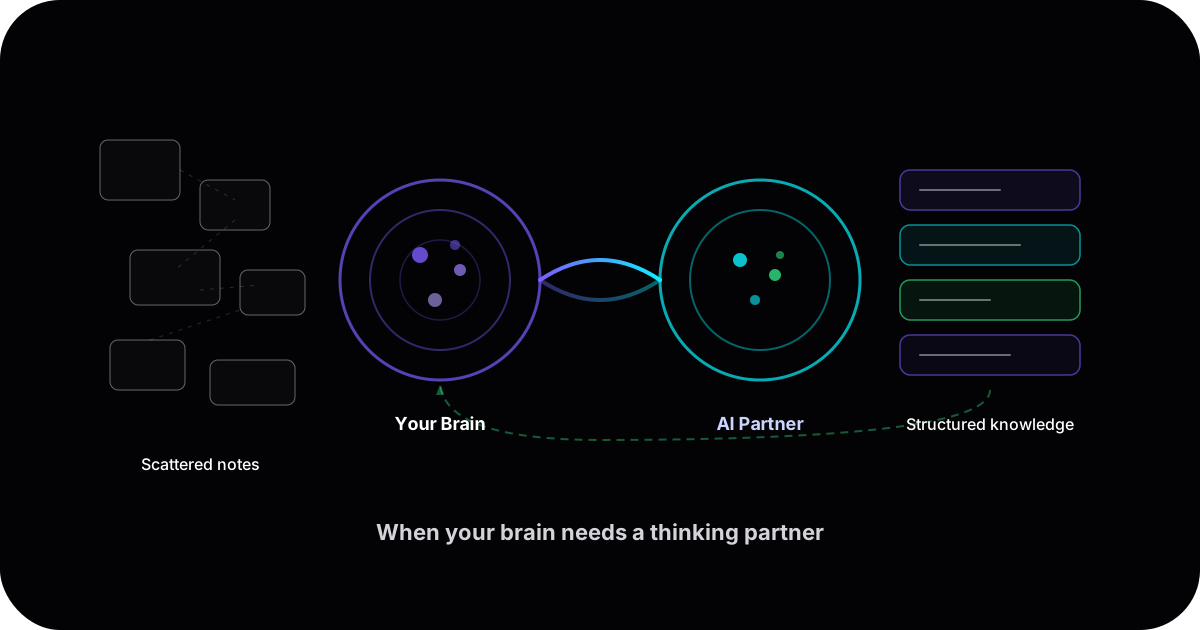
And if you want the simplest way to picture it, it looks like this:
The loop matters. A vault is often a one-way street. A thinking system is a loop that keeps paying you back.
How Kiori works for PKM power users: multimodal in, structured knowledge out
Kiori is built around one reality: your best inputs are not always clean notes. They show up as links, screenshots, voice memos, meeting recordings, PDFs, videos, random highlights, half-written thoughts. So the product goal is not "capture more." The goal is "extract usable information faster, keep it in context, and preserve the reasoning thread so you can resume."
Multimodal input, without the conversion tax
Kiori supports notes and quick text, links, images and screenshots, video, and audio. Then it helps transcribe and extract value so you do not have to manually convert everything into neat prose. That matters because modern workflows increasingly start as audio and video, and transcription quality has improved enough to make this feasible in real tools. [14] The practical win is simple: you stop hoarding "stuff to process later," because processing later stops being such a chore.
Context linking: the missing "why"
Kiori is designed to link information to the question you were trying to answer, the project it belongs to, the decision it influenced, and the related threads where it shows up again. This is how you fight context-dependent forgetting in practice. [11] Your note is no longer just a note. It is part of an evolving chain of reasoning.
Preserving reasoning threads and enabling inline iteration
This is the big one for PKM people who feel like they are constantly "restarting." Kiori treats the messy middle as valuable: working hypotheses, partial conclusions, dead ends, candidate frameworks, and open questions. You can iterate in place with inline AI, not in a separate chat tab where context gets lost. That design choice is directly aimed at the "attention residue plus context switching" issue we described in "Losing the Thread of Thought." [6]
AI as a partner that compensates for cognitive constraints
Kiori's AI is meant to do the parts humans are predictably bad at doing consistently: resurface the most relevant stuff you already have, summarize long transcripts into decisions, risks, and next actions, cluster notes into themes and highlight contradictions, and show you what you are missing and what you keep assuming. It is not meant to declare truth from nothing. It is meant to be grounded in your workspace artifacts. At a technical level, that philosophy aligns with retrieval-augmented approaches like RAG, where generation is coupled with explicit memory retrieval rather than pure parametric recall. [9] And better retrieval, including dense retrieval, is a big part of making that grounding actually useful at scale. [10]
Practical workflows: how you would actually use Kiori
Below are a few short workflows that map to real PKM pain.
Workflow: "I know I thought about this before"
You are writing a doc or making a decision, and you have that annoying feeling: you already did the work somewhere. In a vault-first setup, you search, you skim, you open 12 notes, you get tired, and you re-write it. In Kiori:
- Create a workspace for the current question (example: "Pricing model for dev tool v2").
- Drop in the current constraints (a paragraph, a link to the doc, a few bullets).
- Ask inline AI: "Resurface anything relevant from my prior work and show the top 5 snippets with context."
- Pick what matters and pull it into the thread.
The goal is not to retrieve "everything." It is to retrieve enough to rebuild your mental model quickly, which is exactly where working memory limits bite. [4]
Workflow: "This meeting was good, but no way am I rewatching it"
- Drop the audio or video into the workspace.
- Let Kiori transcribe it.
- Prompt: "Extract decisions, open questions, and action items. Then highlight anything that conflicts with our current plan."
Now you have usable artifacts, linked to the source segment, inside the context of the project that produced them. This is the difference between "captured" and "usable."
Workflow: "Synthesize scattered notes into something I can ship"
Vault-first: you gather notes and try to assemble them manually. This often fails because the notes are fragmented and the synthesis effort is high. In Kiori:
- Pull the relevant notes, links, and transcript extracts into one workspace.
- Ask: "Cluster this into themes and propose an outline."
- Ask: "What is missing? What is the strongest counterargument?"
- You choose the structure and write the argument, using AI for acceleration, not authorship.
That "blind spot" step is the important one. Summaries are cheap. Gaps and counterarguments are where real thinking happens.
A simple mapping of roles: human versus AI partner
This is the mental model that keeps things sane.
| Workflow step | Human does | AI partner does |
|---|---|---|
| Choose the goal | Decide what you are trying to build or decide | N/A |
| Gather inputs | Pick what belongs in the workspace | Help retrieve relevant artifacts |
| Reduce noise | Decide what is obsolete or irrelevant | Summarize, cluster, flag duplicates |
| Build structure | Choose the framing and narrative | Propose outlines, compare alternatives |
| Maintain continuity | Decide next steps and keep direction | Resurface context, summarize threads |
| Reveal blind spots | Decide what to challenge and test | Suggest contradictions, missing variables |
| Produce output | Write, decide, publish, ship | Rewrite, compress, expand on request |
That division is the core promise: humans do the heavy lifting, AI accelerates knowledge-building and focus.
Closing: try a thinking-first week
If you are a PKM power user, you probably do not switch tools casually. Migrating is work. Rebuilding habits is work. Letting go of a system you poured years into is emotionally annoying. But if you are already at the stage where your vault feels like a graveyard of good intentions, you are basically paying the maintenance tax without getting the benefit.
So here is a low-drama suggestion: do not migrate your whole life. Pick one real project. One decision. One research thread you actually care about. Try a thinking-first workflow for a week:
- Bring in messy inputs
- Extract value quickly
- Link everything to the question you are answering
- Keep the reasoning thread alive
- Let AI surface context and blind spots, while you stay in charge
If that feels like your brain on steroids, you will know you are in the right direction. And if it does not, you still learned something important: what kind of system your brain actually needs to think well at your current scale.
References
- Obsidian community forums — discussions on search performance in large vaults and quick switcher vs full search speed.
- Obsidian, Logseq, and Roam Research community forums — threads on vault size limits, graph slowdowns, large page performance, and import issues.
- Baddeley, A. D., & Hitch, G. (1974). "Working Memory." In G. H. Bower (Ed.), The Psychology of Learning and Motivation (Vol. 8, pp. 47–89). Academic Press.
- Cowan, N. (2001). "The Magical Number 4 in Short-Term Memory: A Reconsideration of Mental Storage Capacity." Behavioral and Brain Sciences, 24(1), 87–114.
- Sweller, J. (1988). "Cognitive Load During Problem Solving: Effects on Learning." Cognitive Science, 12(2), 257–285.
- Leroy, S. (2009). "Why Is It So Hard to Do My Work? The Challenge of Attention Residue When Switching Between Work Tasks." Organizational Behavior and Human Decision Processes, 109(2), 168–181.
- Jones, W. (2007). "Personal Information Management." Annual Review of Information Science and Technology, 41(1), 453–504.
- Boardman, R., & Sasse, M. A. (2004). "Stuff Goes into the Computer and Doesn't Come Out: A Cross-Tool Study of Personal Information Management." Proceedings of the SIGCHI Conference on Human Factors in Computing Systems, 583–590.
- Lewis, P., Perez, E., Piktus, A., et al. (2020). "Retrieval-Augmented Generation for Knowledge-Intensive NLP Tasks." Advances in Neural Information Processing Systems, 33, 9459–9474.
- Karpukhin, V., Oğuz, B., Min, S., et al. (2020). "Dense Passage Retrieval for Open-Domain Question Answering." Proceedings of the 2020 Conference on Empirical Methods in Natural Language Processing, 6769–6781.
- Godden, D. R., & Baddeley, A. D. (1975). "Context-Dependent Memory in Two Natural Environments: On Land and Underwater." British Journal of Psychology, 66(3), 325–331.
- Clark, A., & Chalmers, D. (1998). "The Extended Mind." Analysis, 58(1), 7–19.
- Pirolli, P., & Card, S. (2005). "The Sensemaking Process and Leverage Points for Analyst Technology as Identified Through Cognitive Task Analysis." Proceedings of International Conference on Intelligence Analysis, 5, 2–4.
- Radford, A., Kim, J. W., Xu, T., et al. (2023). "Robust Speech Recognition via Large-Scale Weak Supervision." Proceedings of the 40th International Conference on Machine Learning, 28492–28518.
Ready to see Kiori?
Follow your thread
Jump into a live workspace to see how Kiori keeps knowledge connected across threads, docs, and teams.
Related stories
Google's Gemini Embedding 2 puts text, images, video, and audio in one vector space. Here's what that actually changes for RAG and knowledge systems — from someone implementing it in production.
A walkthrough of Kiori's knowledge flywheel — from uploading documents to AI-powered retrieval, visual curation, page creation, and back again. See how knowledge compounds.