
Blog
The Knowledge Flywheel: How Kiori Turns Your Documents Into Compounding Intelligence
A walkthrough of Kiori's knowledge flywheel — from uploading documents to AI-powered retrieval, visual curation, page creation, and back again. See how knowledge compounds.
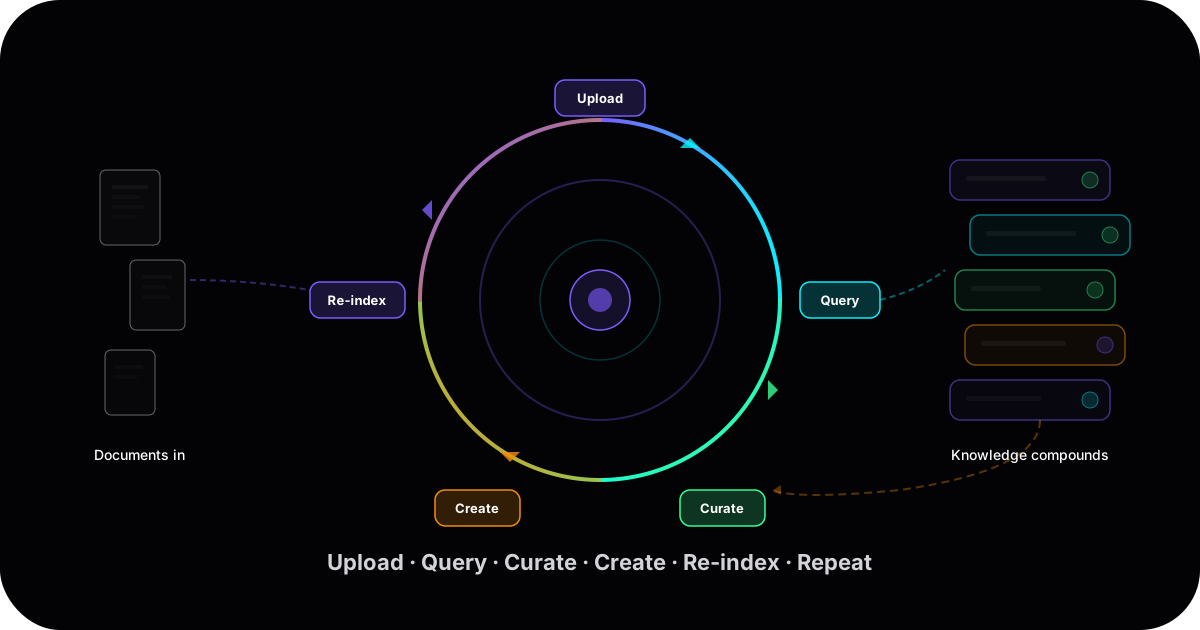
Most knowledge tools store your information. Kiori builds on it.
TL;DR
- Most knowledge tools have a dead end: you put information in, you search for it later. The information sits there, unchanged, until you manually reorganize it.
- Kiori works as a flywheel: Upload → Query → Curate → Create → Re-index → Repeat. Each cycle adds to your knowledge base, making the next cycle more valuable.
- This is different from tools like NotebookLM (which reformats knowledge into podcasts, flashcards, and summaries) or Obsidian (which stores notes you manually link). Kiori is designed around building new understanding from what you already have.
- This post walks through the full loop with concrete examples.
The problem with most knowledge tools
Here's the pattern most of us are stuck in:
You upload a document. Or you write a note. It goes into a folder, a database, a vault. Later, when you need it, you search. Maybe you find it. Probably you don't remember exactly where you put it or what you called it. The information is stored, but it's not working for you. It's just... sitting there.
This is what we've called the gap between capturing and actually using what you know. And it exists across every tool — Notion databases with thousands of pages nobody revisits, Obsidian vaults where capture outpaces retrieval, Google Drive folders that are really just digital filing cabinets.
The fundamental issue: these tools are built around storage and retrieval. Put something in, get it back out. But knowledge work isn't about retrieval — it's about building. Taking what you found last week and connecting it to what you learned yesterday. Synthesizing ideas from different sources into something new. Then having that synthesis feed your next round of exploration.
That's the cycle Kiori is designed around.
The flywheel, step by step
Step 1: Upload — Bring in what you have
The starting point is your existing knowledge. Documents, PDFs, notes, research papers, Google Drive files, OneDrive folders, Notion exports — 15+ formats, with OCR for scanned documents. You can also pull in web content, YouTube transcripts, and audio files.
This isn't a one-time import. Most people add documents over time as projects evolve. The key: everything you upload gets indexed into a queryable knowledge base. Not filed into folders. Not tagged and forgotten. Indexed — so the AI can work with it.
What this actually looks like: You're researching a new market. You drop in 30 analyst reports, 15 competitor landing pages, a few podcast transcripts, and your own notes from conversations. All of it becomes queryable within minutes.
Step 2: Query — Work with your documents through AI threads
This is where the interaction begins. Threads are Kiori's AI interface — conversational, but grounded in your documents.
Ask a question. Get an answer with citations. Every response points back to the specific chunks of your documents it drew from. Confidence scores show how well the answer matches your actual content — so you know when the AI is on solid ground and when it's reaching.
Three modes for different needs:
- Finder: Pure document search. "What did the Q3 report say about churn rates in EMEA?" It finds the answer in your documents and shows you exactly where.
- GPT: General knowledge combined with your documents. "How does our pricing compare to industry benchmarks?" It draws from both your uploaded data and general knowledge.
- Agent: Deep multi-document analysis. "Compare the recommendations across all five strategy documents and identify contradictions." It works across documents, synthesizes, and builds a structured response.
What this actually looks like: You ask, "What are the top three risks mentioned across these analyst reports?" The Agent mode reads across all 30 reports, identifies recurring themes, and gives you a synthesized answer with citations pointing to specific pages in specific documents. You can click through to verify each claim.
This is fundamentally different from how traditional document search works. You're not searching by keywords and scanning results. You're asking questions in natural language and getting grounded answers.
Step 3: Curate — Organize insights on visual canvases
Here's where most tools stop. You got your answer from the AI. You copy-paste it somewhere. Maybe you screenshot it. The insight exists — but it's disconnected from everything else you're building.
In Kiori, you move from threads to canvases. Canvases are visual boards with 14+ card types — notes, snippets from AI threads, document excerpts, links, images, videos, and more. You drag, resize, group, and connect cards spatially.
The point isn't just organization. It's curation — deciding what matters, placing it in context, and starting to see patterns. When you pull a snippet from an AI thread onto a canvas, it retains its source citation. When you place it next to three other snippets from different documents, connections emerge that you wouldn't have seen by reading each document sequentially.
Canvases also have their own AI tools: summarization of selected cards, gap analysis ("what's missing from this collection?"), and related content suggestions. The canvas becomes a thinking surface, not just a storage surface.
What this actually looks like: You've queried across your 30 analyst reports and a dozen conversations. You drag the most important findings onto a canvas. You group them by theme — market risks, pricing signals, competitor moves. You notice a gap: nobody's talking about the regulatory angle. The canvas AI confirms it — there's a blindspot. You know where to dig next.
Step 4: Create — Build polished pages from your raw thinking
This is the step that closes the loop — and the one most tools don't have.
Before, you would gather your notes and write a new structured document to store in your knowledge base. This is basically the same — with the difference that you have an AI-powered assistant. From your curated canvas, you create pages. Kiori's page editor is a rich document editor — tables, code blocks, multi-column layouts, embedded media — powered by the cards and snippets you've curated. You're not starting from a blank page. You're building from fragments you've already validated and organized.
Pages are where raw findings become synthesized thinking. A canvas might have 40 cards scattered across themes. A page distills that into a structured analysis, a decision document, a strategy brief.
What this actually looks like: You take your canvas of market research findings and create a page: "Market Entry Analysis: Key Risks and Opportunities." The page pulls from your curated cards, adds your own analysis and conclusions, and becomes a standalone document. It took two hours instead of two days, because you weren't starting from scratch — you were building from curated, cited, organized fragments.
Step 5: Re-index — Your new thinking feeds the system
Here's the flywheel moment.
When you create a page in Kiori, it gets automatically re-indexed into your knowledge base. That analysis you just wrote? It's now queryable. Your next AI thread can draw on it. Your next project can build on it.
This is what we mean by knowledge compounding. The work you did last month isn't just stored — it's woven into the system. When you ask a new question six months from now, the AI draws on your original source documents AND on the pages you created from them. Your synthesized thinking has become part of your knowledge base, not a dead document in a folder.
What this actually looks like: Three months after your market analysis, a colleague asks about competitive pricing in EMEA. They query the workspace. The AI draws on the original analyst reports, your market entry analysis page, and the pricing canvas your team built in between. The answer synthesizes across months of accumulated thinking — not just raw sources.
Step 6: Share — Or keep it going
The flywheel doesn't require sharing, but sharing extends it. You can share pages and canvases with your team in a shared workspace. Or make a workspace public, so visitors can browse your content and ask AI-powered questions against it — the same technology that powers Kiori Community.
Sharing isn't the end of the cycle. It's a branching point. Your team reads the analysis, adds new documents, asks new questions, curates their own canvases. Communities form around shared workspaces — contributing knowledge, asking questions, and building on each other's work. The flywheel keeps spinning, now with more minds contributing to it.
How this differs from NotebookLM
This is a comparison that comes up often, and the distinction matters.
NotebookLM is excellent at reformatting knowledge. Upload your documents, and it generates podcasts, flashcards, slides, study guides, FAQs. These are useful outputs. But they're endpoints — the generated podcast doesn't feed back into your knowledge base. The flashcards don't compound. Each output is a reformatted version of your input, not a building block for future work.
We explored this distinction in depth in our comparison of knowledge workbenches. The short version: NotebookLM transforms knowledge into different formats. Kiori transforms knowledge into new knowledge — and feeds it back in.
This isn't a criticism of NotebookLM. If you need to create a podcast from your research notes or generate study flashcards from a textbook, it's the best tool for that job. But if your goal is to build on what you know over time — to have your tool get smarter as you use it — the flywheel approach is different by design.
A concrete example: building a TTRPG campaign wiki
Abstract descriptions only go so far. Here's a real example from how Kiori was originally built.
The starting point: A tabletop role-playing game (Zenithfall) with hundreds of pages of lore, character sheets, campaign history, and world-building documents. Players needed to find information during sessions but couldn't navigate the material quickly enough.
Step 1 (Upload): All campaign documents, session notes, character sheets, and world-building files uploaded to Kiori. Indexed automatically.
Step 2 (Query): During session prep, the game master asks: "What do we know about the political structure of the Northern Kingdoms? Which NPCs are aligned with which factions?" The AI retrieves answers across dozens of documents, citing specific world-building notes and session recaps.
Step 3 (Curate): Key lore elements get organized on canvases — one for factions, one for geography, one for active plot threads. Cards link to source documents. Gap analysis reveals: the economic system of the Northern Kingdoms has never been defined.
Step 4 (Create): A new page: "The Northern Kingdoms: Politics, Economy, and Major Factions." It synthesizes existing lore, fills the economic gap with new world-building, and becomes the definitive reference for this part of the world.
Step 5 (Re-index): The new page is automatically indexed. Next time someone asks about the Northern Kingdoms, the AI draws on the original scattered notes AND the synthesized page. The next session prep starts from a stronger foundation.
Step 6 (Share): The workspace is made public. Players can browse lore pages and canvases. During sessions, they can ask the workspace: "What happened to Captain Voss in our last session?" and get a sourced answer without interrupting the game.
You can see this in action at zenithfall.kiori.co — a live example of what a public knowledge workspace looks like.
Why "flywheel" and not just "workflow"
A workflow has a beginning and an end. You follow the steps, you get an output, you're done.
A flywheel builds momentum. Each turn makes the next turn easier and more productive. In Kiori's case:
- The more documents you upload, the better the AI retrieval becomes (more context to draw from).
- The more canvases you curate, the faster you see patterns and gaps.
- The more pages you create, the richer your knowledge base becomes for future queries.
- The more you use the system, the more your accumulated thinking becomes a permanent asset rather than something trapped in your working memory.
This is what we mean by knowledge compounding. It's not a metaphor — it's a system property. The output of one cycle becomes the input of the next.
Getting started
The free tier gives you the full flywheel experience: AI threads, canvases, and pages with 100 documents and 100 MB of storage. The Pro plan (€10/mo) opens it up to 2,500 documents, unlimited canvases and pages, and 5,000 AI requests per day.
If you want to see the flywheel in action before signing up, browse the Zenithfall community workspace — it's a live example of what the upload → query → curate → create → share cycle produces.
References
- Kiori — kiori.co — AI Knowledge Workspace. Features and pricing.
- Zenithfall — zenithfall.kiori.co — Live example of a public Kiori workspace.
- Kiori Blog — "From Disposable Answers to Living Knowledge" — The case for knowledge continuity.
- Kiori Blog — "Notetaking in the Age of AI" — Why capture outpaces retrieval in traditional PKM tools.
- Kiori Blog — "NotebookLM, Notion AI, and Knowledge Workbenches" — Comparing knowledge tool approaches.
Ready to see Kiori?
Follow your thread
Jump into a live workspace to see how Kiori keeps knowledge connected across threads, docs, and teams.
Related stories
Google's Gemini Embedding 2 puts text, images, video, and audio in one vector space. Here's what that actually changes for RAG and knowledge systems — from someone implementing it in production.
Fandom is broken, MediaWiki is outdated, and Wiki.gg is incremental. Explore the best wiki and Fandom alternatives in 2026 — community-owned, ad-free, and AI-augmented.